


 How Teachers Can Create AR Lessons Without Coding: A Complete Guide for Educators
How Teachers Can Create AR Lessons Without Coding: A Complete Guide for Educators
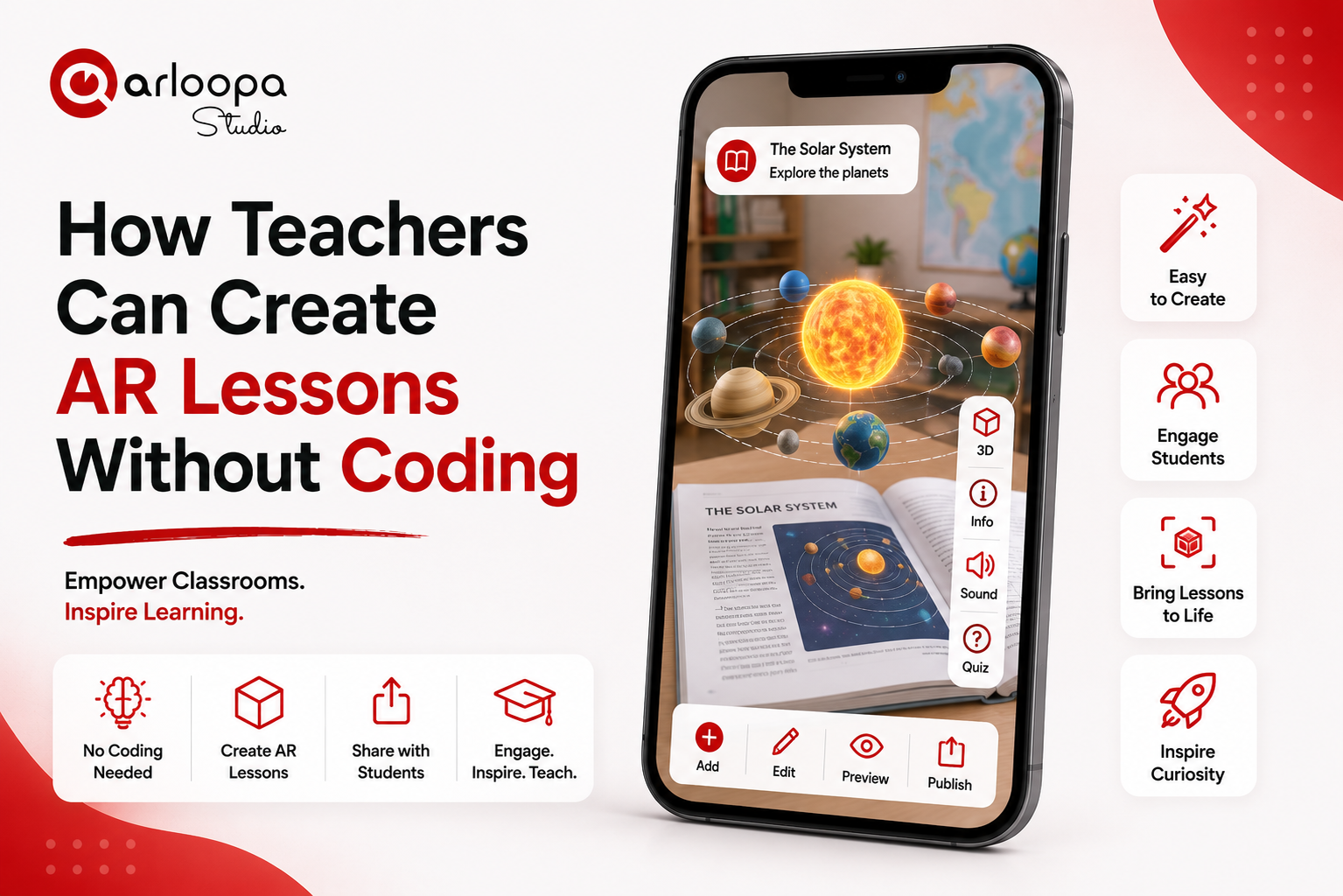
Augmented reality (AR) is transforming classrooms by making learning more interactive, visual, and engaging. Imagine students exploring the solar system in 3D, examining the human heart from every angle, or watching historical landmarks come to life - all from a smartphone or tablet.
The best part? Teachers no longer need programming skills to create these experiences.
Thanks to no-code AR platforms, educators can design immersive lessons using simple drag-and-drop tools, interactive media, and 3D content. This allows teachers to focus on creating meaningful learning experiences instead of learning how to code.
In this guide, we'll explore how teachers can create AR lessons without coding and how augmented reality is making education more engaging than ever.
Why Use Augmented Reality in Education?
Traditional teaching methods often rely on textbooks, slides, and videos. While these resources are valuable, they can make it difficult for students to visualize complex concepts.
Augmented reality bridges that gap by placing digital content directly into the real world. Instead of imagining how something looks or works, students can interact with 3D models, animations, and multimedia content in real time.
Research and classroom experience show that AR can help:
- Increase student engagement
- Improve understanding of complex topics
- Encourage active participation
- Support different learning styles
- Make lessons more memorable
Whether you're teaching science, history, geography, mathematics, or art, AR can bring abstract concepts to life.
What Is a No-Code AR Platform?
A no-code AR platform allows users to create augmented reality experiences without writing a single line of code.
Instead of programming, teachers can:
- Upload images and videos
- Add 3D models
- Insert audio explanations
- Create interactive buttons
- Arrange content using a visual editor
- Publish experiences for students to access instantly
This makes AR accessible to educators regardless of their technical background.
Benefits of Creating AR Lessons Without Coding
1. Save Time
Learning software development can take months or even years. No-code tools eliminate that barrier, allowing teachers to build lessons in hours instead of weeks.
Teachers can spend more time designing educational activities and less time learning technical skills.
2. Make Learning More Interactive
Interactive lessons keep students engaged.
Instead of passively reading information, students can:
- Explore 3D objects
- Watch educational animations
- Interact with virtual models
- Access multimedia content through AR
- Learn by doing rather than simply observing
This active participation helps improve both understanding and retention.
3. Teach Difficult Concepts Visually
Some subjects are difficult to explain using text alone.
AR makes it easier to teach topics such as:
- Human anatomy
- The solar system
- Molecular structures
- Geometry
- Engineering concepts
- Ancient civilizations
- Geography and landscapes
Students can view objects from every angle and interact with them directly.
4. Increase Student Engagement
Today's students are digital natives who are accustomed to interactive technology.
AR captures attention by turning ordinary classroom materials into immersive learning experiences.
Interactive lessons often encourage curiosity, exploration, and collaboration among students.
How Teachers Can Create an AR Lesson
Creating an AR lesson is simpler than many educators expect.
Step 1: Define Your Learning Objective
Start by identifying what students should learn.
Examples include:
- Understanding the structure of a cell
- Learning about planets
- Exploring historical artifacts
- Visualizing geometric shapes
- Studying animal anatomy
A clear objective helps determine what AR content will be most effective.
Step 2: Gather Your Content
Collect the materials you'll use in your lesson.
These may include:
- Images
- Videos
- Audio recordings
- PDFs
- Presentations
- 3D models
- Animations
You can also use AI-generated 3D models to quickly create educational content for your AR experiences.
Step 3: Build the AR Experience
Using a no-code platform like ARLOOPA Studio, teachers can combine different types of media into one interactive lesson.
For example, students might scan a page in a textbook to reveal:
- A rotating 3D model
- Labels identifying key parts
- Voice narration
- Instructional videos
- Interactive quizzes
- Additional learning resources
Everything is assembled through an intuitive visual interface - no coding required.
Step 4: Publish and Share
Once your lesson is complete, publish it and share it with students.
Depending on your chosen delivery method, students can access the experience by:
- Scanning an image
- Opening a WebAR link
- Scanning a QR code
- Viewing content through the ARLOOPA app
This flexibility makes AR suitable for both classroom and remote learning.
Creative AR Lesson Ideas
Science
Bring biology, chemistry, and physics to life with interactive 3D models.
Students can explore:
- Human organs
- DNA structures
- Chemical molecules
- Volcanoes
- Ecosystems
History
Transform history lessons into immersive experiences.
Students can:
- Explore historical artifacts
- View ancient architecture in 3D
- Watch historical events recreated through AR
- Learn about famous historical figures
Geography
Help students better understand the world by displaying:
- Mountains
- Volcanoes
- Rivers
- Countries
- Climate zones
- Landforms
Interactive maps become much more engaging in AR.
Mathematics
AR makes abstract mathematical concepts easier to visualize.
Teachers can create lessons featuring:
- 3D geometric shapes
- Angles
- Graphs
- Fractions
- Measurements
Students gain a deeper understanding through hands-on interaction.
Language Learning
AR can make vocabulary lessons more engaging by attaching words, images, pronunciation guides, and audio to everyday objects.
Students interact with language instead of simply memorizing it.
Creating Educational Experiences with ARLOOPA Studio
ARLOOPA Studio empowers teachers to build interactive educational content without programming.
Using its intuitive visual editor, educators can create immersive lessons with features such as:
- Image Tracking to make textbook pages, worksheets, or classroom posters come alive with digital content.
- Surface Tracking to place interactive 3D models on desks or classroom floors for hands-on exploration.
- WebAR to let students access lessons directly from a browser—no app download required.
- AI-powered 3D model generation to quickly create educational assets from simple prompts.
- Support for videos, audio, animations, PDFs, and interactive buttons to enrich learning experiences.
Whether you're teaching in a primary school, secondary classroom, university, or training environment, ARLOOPA Studio helps transform traditional lessons into engaging, interactive experiences that inspire curiosity and improve learning outcomes.
Start Creating AR Lessons Today
You don't need programming skills to bring augmented reality into your classroom.
With ARLOOPA Studio, teachers can build engaging AR lessons using a simple no-code workflow, helping students interact with educational content in entirely new ways.
Whether you're creating science demonstrations, history projects, language activities, or STEM lessons, ARLOOPA Studio provides the tools to make learning more visual, memorable, and inspiring.


See more articles



Solutions