


 How to Create AR for Packaging and Product Marketing: A Step-by-Step Guide
How to Create AR for Packaging and Product Marketing: A Step-by-Step Guide
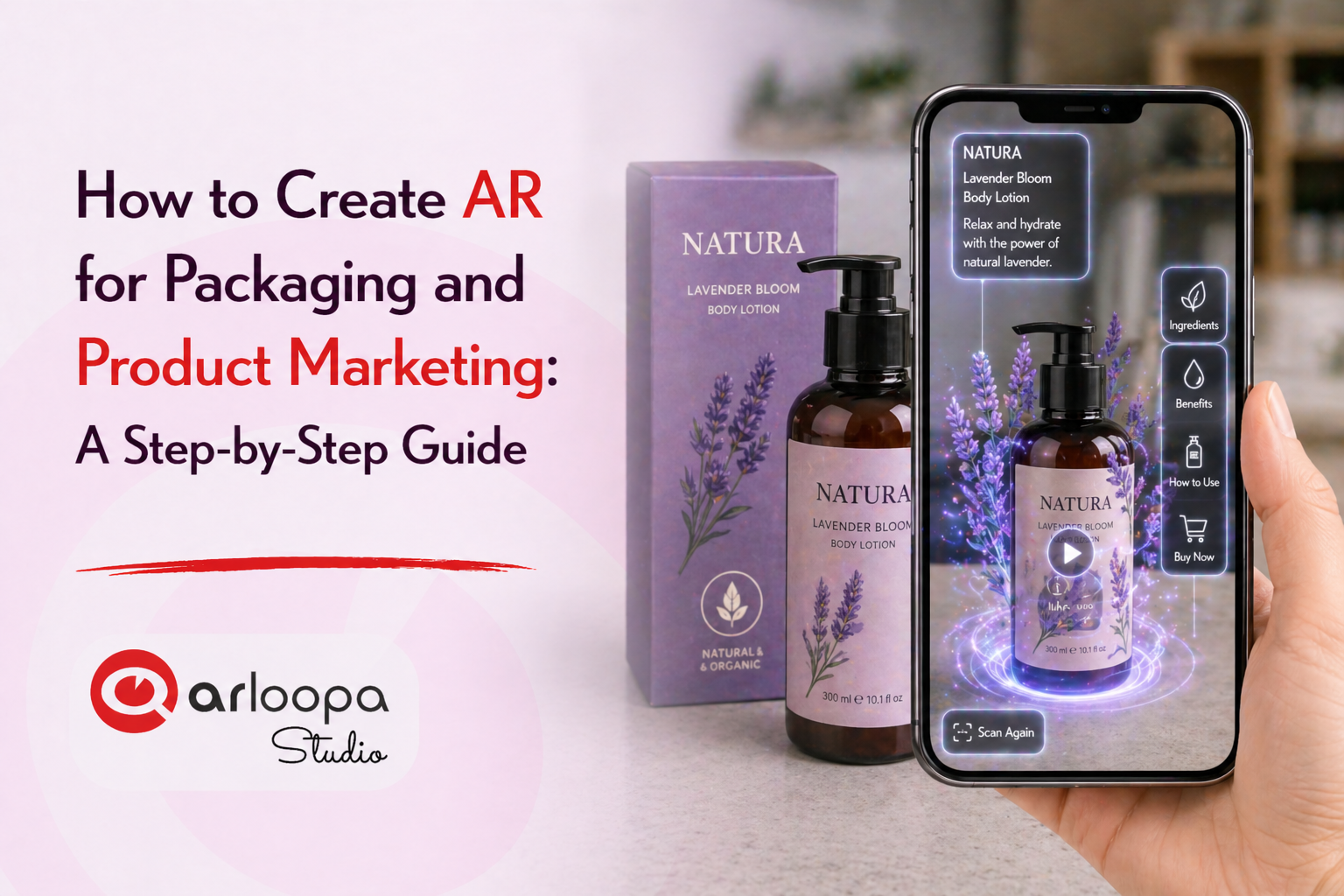
Augmented Reality (AR) is transforming how brands connect with customers, and one of its most powerful applications is AR for packaging and product marketing.
Instead of static packaging, businesses can now create interactive product experiences that engage customers, tell brand stories, and increase sales.
In this guide, you’ll learn how to create AR for packaging, how it works, and how brands can use it to enhance product marketing.
What Is AR for Packaging and Product Marketing?
AR packaging uses augmented reality technology to add digital content to physical product packaging.
When customers scan a package using their smartphone, they can unlock:
- 3D product visualizations
- interactive animations
- videos and tutorials
- brand storytelling experiences
- promotional offers
This turns packaging into a powerful marketing tool that extends beyond the physical product.
Why Use Augmented Reality for Product Marketing?
Before we dive into how to create AR experiences, let’s look at why AR is so effective.
Increased Customer Engagement
Interactive experiences capture attention and encourage users to explore your product.
Stronger Brand Connection
AR allows brands to tell stories and create emotional engagement.
Better Product Understanding
Customers can see how a product works through interactive demos.
Higher Conversion Rates
Engaged customers are more likely to make purchasing decisions.
Step 1: Define Your AR Marketing Goal
Start by identifying what you want to achieve with your AR experience.
Your goal might be to:
- promote a new product
- increase brand awareness
- educate customers
- create a viral campaign
- enhance packaging experience
Having a clear objective will guide your AR design and content.
Step 2: Choose the Right AR Trigger
AR experiences need a trigger to activate.
For packaging, common triggers include:
Image-Based Triggers
The product label or packaging design itself acts as the trigger.
QR Codes
Customers scan a code to launch the AR experience.
Surface-Based AR
Digital content appears on a flat surface near the product.
Choosing the right trigger ensures a smooth user experience.
Step 3: Design Your AR Experience
Next, decide what customers will see when they scan your product.
Popular AR packaging ideas include:
- animated 3D characters on packaging
- interactive product demos
- storytelling experiences about your brand
- gamified experiences (e.g., mini games)
- step-by-step tutorials
Keep the experience simple, engaging, and relevant to your product.
Step 4: Create Digital Content
To build your AR experience, you’ll need digital assets such as:
- 3D models
- animations
- videos
- images
- sound effects
High-quality visuals are important because they directly impact user engagement.
Step 5: Build the AR Experience
Using a platform like ARLOOPA Studio, you can create your AR experience without coding.
With ARLOOPA Studio, you can:
- upload your trigger image (packaging design)
- add 3D models and animations
- attach videos or interactive elements
- customize how users interact with the content
This step connects your physical packaging with digital experiences.
Step 6: Test the Experience
Before launching your AR campaign, test it thoroughly.
Make sure:
- the trigger is easily recognized
- the AR content loads quickly
- the experience works on different devices
- interactions are smooth and intuitive
Testing ensures a better customer experience.
Step 7: Launch and Promote
Once your AR experience is ready, it’s time to launch.
Promote it through:
- social media campaigns
- product packaging instructions
- in-store displays
- website and email marketing
Make it clear to customers how to scan and access the AR experience.
Create AR Packaging with ARLOOPA Studio
If you want to create AR experiences for your products, ARLOOPA Studio makes it simple.
With ARLOOPA Studio, you can build:
- interactive packaging experiences
- AR marketing campaigns
- product visualizations
- immersive storytelling content
No coding required.
Augmented Reality is redefining how brands use packaging and product marketing.
By turning physical products into interactive digital experiences, AR helps businesses engage customers, increase brand awareness, and drive sales.
As consumer expectations evolve, AR packaging will become an essential tool for brands looking to stay ahead.


See more articles



Solutions